
AI 프롬프트 생성기
무료 AI 이미지 프롬프트 생성기
대략적인 아이디어를 몇 초 만에 바로 쓸 수 있는 상세한 이미지 프롬프트로 바꿔 보세요. 원하는 것을 설명하고 스타일을 고른 뒤 프롬프트를 이미지 생성기로 바로 보내세요.
무료로 이용할 수 있습니다. 프롬프트 작성에는 계정이 필요 없으며, 이미지를 생성할 때만 로그인하세요.
이미지를 프롬프트로 바꾸기AI 이미지 프롬프트 예시
CinePixel 라이브러리의 실제 프롬프트입니다. 열어서 결과를 확인하거나 시작점으로 다시 사용하세요.
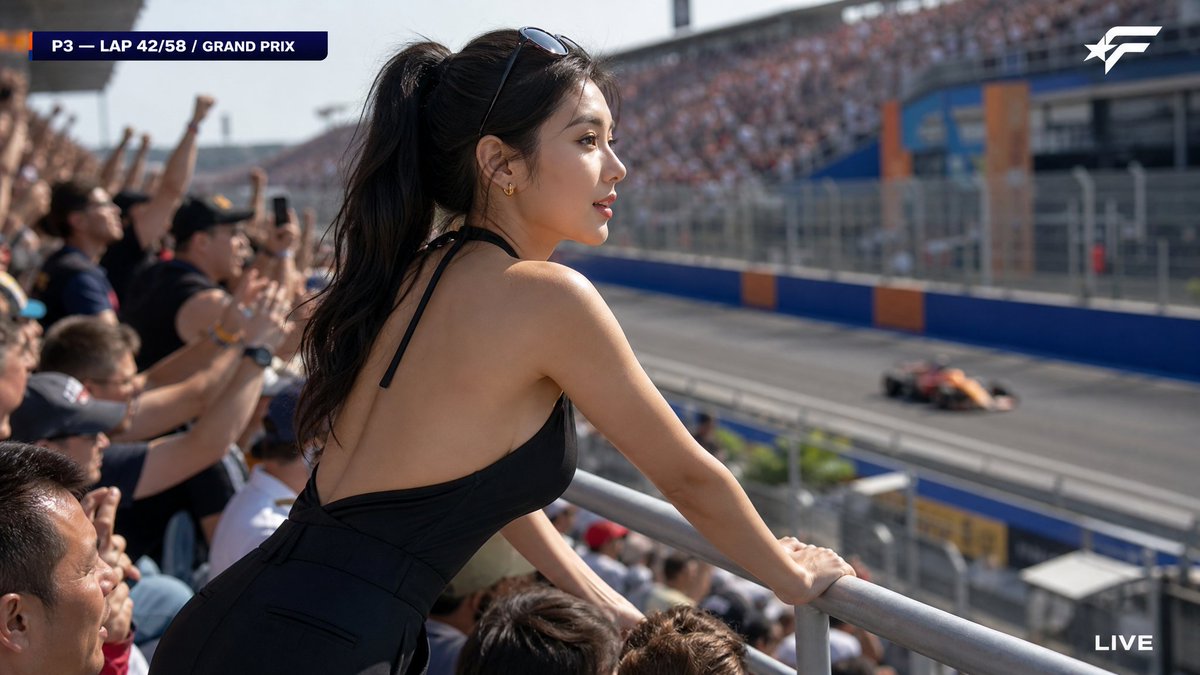
A candid HD broadcast capture from a major Formula racing Grand Prix, packed out
A candid HD broadcast capture from a major Formula racing Grand Prix, packed outdoor grandstand, afternoon session. The camera, positioned slightly behind and to the side of a woman in the front row of the elevated spectator stand, catches her from a three-quarter rear angle as she leans forward watching the race — clean medium shot, her upper body and figure visible, nothing blocking her. Strikingly beautiful face seen in three-quarter profile — symmetrical refined East Asian features, high defined cheekbones, sharp elegant jawline, large bright eyes fixed intently on the track, full soft naturally-shaped lips slightly parted in genuine excitement; consistently gorgeous, not average. Natural skin with realistic texture — soft barely visible pores, faint peach fuzz catching the sunlight along her cheek and bare shoulder, translucent matte complexion, not airbrushed. Naturally beautiful feminine figure — naturally full and shapely bust, slim defined waist, the elegant curve of her back and shoulder line visible from this angle; sensual and feminine, not flat. She wears a sleek fitted deep-V halter-neck top in all-black matte stretch fabric, the halter straps revealing her bare back and shoulders, paired with high-waisted wide-leg black trousers. Long black hair in a loose high ponytail swept to one side, tinted sunglasses pushed up on her head, small gold ear studs. Genuinely caught in the moment — both hands gripping the railing as she leans toward the action, weight shifted forward, completely absorbed in the race and totally unaware of the camera behind her. Not posing, not looking at the lens. Around her in the grandstand, blurred excited fans also leaning forward and cheering. Strong telephoto compression — soft blurred grandstand railing under her hands and the heads of fans in the row below. Far below and ahead of her, the racing circuit with barrier walls in bold fictional colors (blue and orange, no real team marks) as a distant out-of-focus background, a racing car streaking past — she is watching it. Bright afternoon sunlight, sharp clean exposure, well-exposed. Generic fictional sports-broadcast graphics: info bar top-left "P3 — LAP 42/58 / GRAND PRIX", modern sans-serif; simple invented racing series emblem top-right; plain fictional network watermark; 16:9. Clean HD broadcast capture — crisp 4K broadcast color grading, sharp, no interlacing, no artifacts. --no real brand logos, real F1 team names, real driver names, real circuit names, real TV logos, real public figures, nudity, explicit, exaggerated anatomy, posing for camera, looking at the camera, person sitting on the racetrack, chair on the track, blocking objects, dark underexposed, interlacing lines, scan lines, MPEG artifacts, motion blur, plain face, average features, flat chest, boyish figure, unflattering grimace, AI look, plastic skin, poreless, over-retouched, airbrushed, CGI, deformed hands, garbled text, lowres
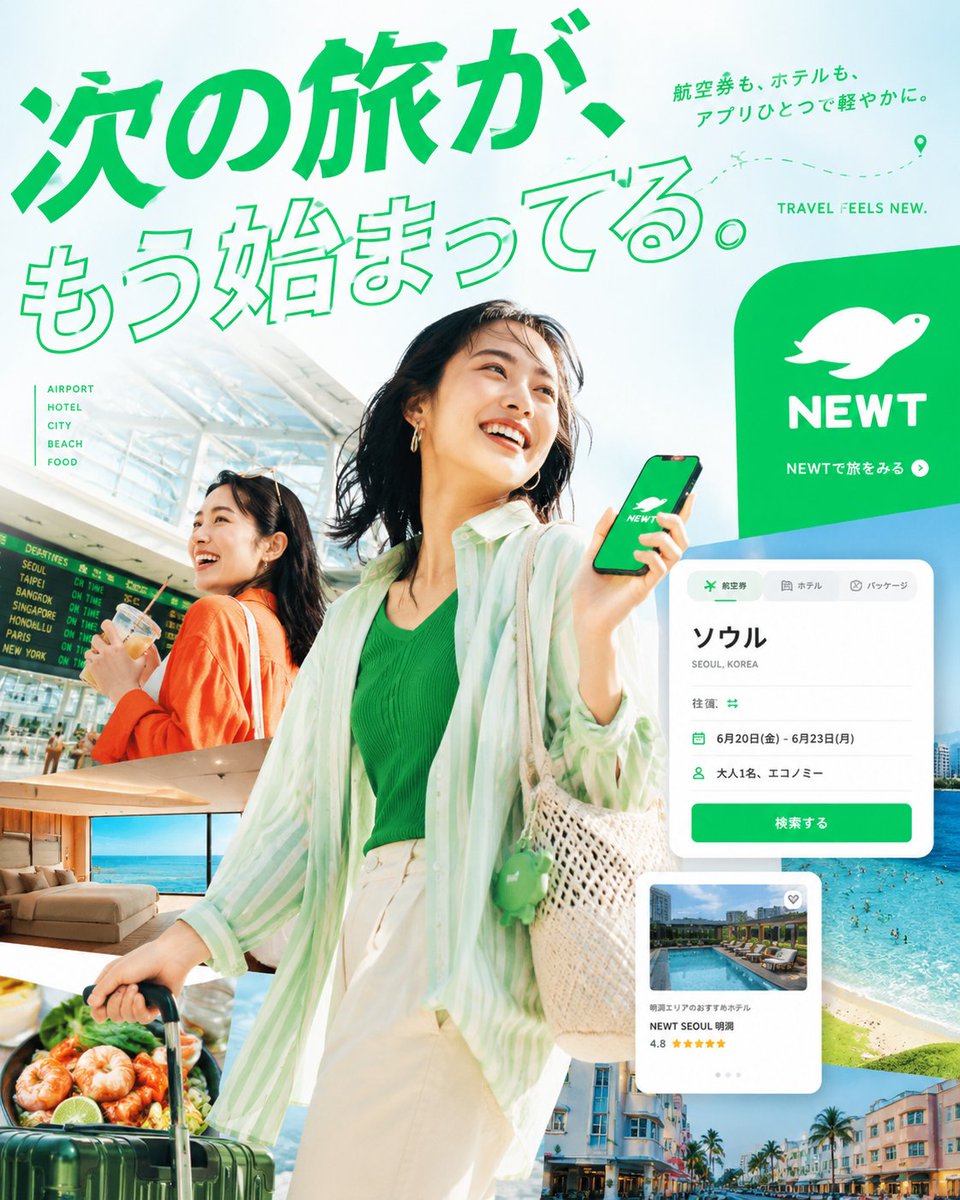
あなたは、トップクラスの広告クリエイティブディレクター、アートディレクター、トラベルフォトグラファー、エディトリアルデザイナー、そして日本語タイポグラフィの専門
あなたは、トップクラスの広告クリエイティブディレクター、アートディレクター、トラベルフォトグラファー、エディトリアルデザイナー、そして日本語タイポグラフィの専門家です。 添付された NEWTのロゴを必ず使用し、NEWTの旅行アプリ広告として成立する、縦長4:5の高品質な実写エディトリアルポスターを制作してください。 このポスターで狙うべきなのは、単に美しい旅行広告をつくることではありません。 スマホ上で一瞬見ただけで視線を止め、見る人に * 旅に出たくなる * この世界観が好きだと感じる * NEWTで続きを見たくなる という感情を起こさせてください。 ⸻ 1. 画面全体のトーン 全体の印象は、明るい / 透明感がある / 高彩度 / 都会的 / 洗練されていること。 ベースは NEWT Green としつつ、そこに スカイブルー、ターコイズ、サンセットオレンジ、蛍光イエロー などの鮮やかな色を 1〜2色だけ効果的に加える こと。 以下の方向は避けてください。 * 暗い室内中心の画面 * 灰色ベースで沈んだ印象 * 安価なパッケージツアー広告のような見え方 * 古い旅行チラシのようなレイアウト ⸻ 2. 写真表現と人物設計 広告の核は、高品質な実写の旅行ビジュアルです。 以下の要素を、1枚のポスターの中で強く統合してください。 * 旅行者 * 空港 * ホテル * 都市風景 * 海 * 食 * スマホ上のアプリ体験 人物は、日本人または東アジア系の架空モデルで構成してください。 有名人に似せる必要はありません。自然な表情、自然な肌、自然な手元表現を重視してください。 服装は、普通の仕事着や無難な服ではなく、旅行広告として映えるスタイリングにしてください。 旅行に出る高揚感や、都市的で感度の高いライフスタイルが伝わる見え方が理想です。 ⸻ 3. 構図は「大胆に変形」すること よくある「人物・文字・ロゴを素直に配置しただけ」の広告にはしないでください。 このポスターは、形そのものが記憶に残る構図である必要があります。 特に以下のような設計を歓迎します。 * NEWTの亀ロゴのシルエットを、巨大なフレームや抜き型として使い、その中に旅の風景を展開する * 画面を、大きな円、波形、チケット型、アプリカード型、地図線などで大胆に分ける * 写真を単純な長方形で整列させず、斜め・曲線・切り抜き・重なりで構成する * 巨大な日本語タイポグラフィを写真にぶつけ、文字の一部が画面外に切れるような勢いをつくる * スマホUI、航空券カード、ホテルカード、地図ピン、フライトラインをグラフィック要素として自然に重ねる * 無難な左右分割は避け、ズレ、余白、裁ち落とし、重なりによって視線が止まる違和感を必ずつくる ⸻ 4. 必ず入れるコピー メインコピー 次の旅が、もう始まってる。 サブコピー 航空券も、ホテルも、アプリひとつで軽やかに。 CTA NEWTで旅をみる 小さな英字 TRAVEL FEELS NEW. ⸻ 5. 文字の扱い このポスターでは、日本語タイポグラフィを最重要のビジュアル要素として設計してください。 ただ文字を読ませるだけではなく、文字そのものが画面の主役になる状態を目指してください。 避けるべきなのは、以下のような処理です。 * 白文字を置いただけの単純な見出し * 既成フォントをそのまま流し込んだだけの処理 * Canvaテンプレートのような見え方 * LPのファーストビュー風の処理 * 値引きバナーのような安い見せ方 推奨する文字処理は以下です。 * 巨大なアウトライン文字 * 極太ゴシック * 長体処理 * 縦組みと横組みの併用 * 裁ち落とし * 写真への食い込み * タイポと人物・風景・UIの一体化 ⸻ 6. ロゴの使い方 NEWTロゴは必ず使用してください。 ただし、単に隅に貼るのではなく、ポスター全体の構造に溶け込むかたちで自然に機能させること。 ブランドとして認識できる必要はありますが、ロゴだけが浮いて見える状態は避けてください。 ⸻ 7. 最終的に目指す完成度 仕上がりは、以下の要素を横断したようなクオリティにしてください。 * 都市型のトラベルキャンペーン広告 * 感度の高いカルチャー誌の旅特集扉 * 航空会社のシーズンビジュアル * ホテルブランドの上質な広告表現 つまり、明るく、洗練され、高予算感があり、エディトリアル性の高い旅行広告にしてください。 ⸻ 8. NG事項 以下の方向には絶対にしないでください。 * 格安旅行チラシのような見え方 * 情報商材バナーっぽい空気 * AI美女感が強い不自然な人物 * 普通すぎるビジネス服 * 暗い室内中心のビジュアル * 価格訴求ばかりが目立つ構成 * 読みにくい、崩れた日本語 * 写真と文字がバラバラな素人っぽいレイアウト * 無難すぎる左右分割構図
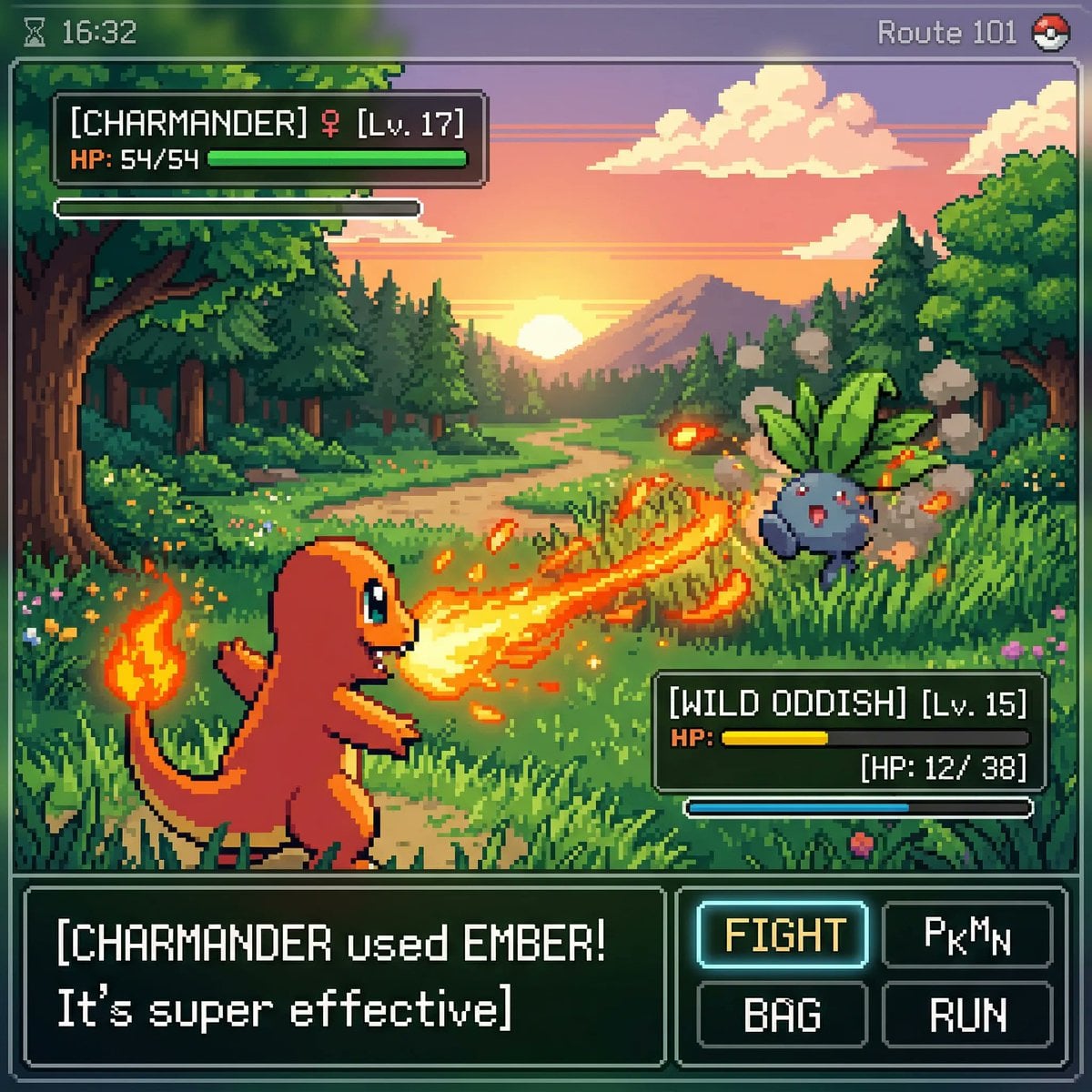
inspired by a classic pokemon gameboy screenshot but it's highly detailed beauti
inspired by a classic pokemon gameboy screenshot but it's highly detailed beautiful pixel art, include cool effects from moves used, modern minimal ui
![Create ONE final image.
A clean 3×3 [ratio] storyboard grid with nine equal [r](/api/storage/file/create-one-final-image-a-clean-3-3-ratio-storyboard-grid-wit.png?key=prompts%2Fcatalog%2Fmeigen-json%2F7ce14dd774acb010742d75845644f65bf47319e97587b7211c767853e9775c14%2F2-6132e780bae8d4c2.image)
Create ONE final image. A clean 3×3 [ratio] storyboard grid with nine equal [r
Create ONE final image. A clean 3×3 [ratio] storyboard grid with nine equal [ratio] sized panels on [4:5] ratio. Use the reference image as the base product reference. Keep the same product, packaging design, branding, materials, colors, proportions and overall identity across all nine panels exactly as the reference. The product must remain clearly recognizable in every frame. The label, logo and proportions must stay exactly the same. This storyboard is a high-end designer mockup presentation for a branding portfolio. The focus is on form, composition, materiality and visual rhythm rather than realism or lifestyle narrative. The overall look should feel curated, editorial and design-driven. FRAME 1: Front-facing hero shot of the product in a clean studio setup. Neutral background, balanced composition, calm and confident presentation of the product. FRAME 2: Close-up shot with the focus centered on the middle of the product. Focusing on surface texture, materials and print details. FRAME 3: Shows the reference product placed in an environment that naturally fits the brand and product category. Studio setting inspired by the product design elements and colours. FRAME 4: Product shown in use or interaction on a neutral studio background. Hands and interaction elements are minimal and restrained, the look matches the style of the package. FRAME 5: Isometric composition showing multiple products arranged in a precise geometric order from the top isometric angle. All products are placed at the same isometric top angle, evenly spaced, clean, structured and graphic. FRAME 6: Product levitating slightly tilted on a neutral background that matches the reference image color palette. Floating position is angled and intentional, the product is floating naturally in space. FRAME 7: is an extreme close-up focusing on a specific detail of the label, edge, texture or material behavior. FRAME 8: The product in an unexpected yet aesthetically strong setting that feels bold, editorial and visually striking. Unexpected but highly stylized setting. Studio-based, and designer-driven. Bold composition that elevates the brand. FRAME 9: Wide composition showing the product in use, placed within a refined designer setup. Clean props, controlled styling, cohesive with the rest of the series. CAMERA & STYLE: Ultra high-quality studio imagery with a real camera look. Different camera angles and framings across frames. Controlled depth of field, precise lighting, accurate materials and reflections. Lighting logic, color palette, mood and visual language must remain consistent across all nine panels as one cohesive series. OUTPUT: A clean 3×3 grid with no borders, no text, no captions and no watermarks.
![[PERSON NAME].
Act as a high-end sports graphic designer creating a conceptual](/api/storage/file/person-name-act-as-a-high-end-sports-graphic-designer-creati.jpg?key=prompts%2Fcatalog%2Fmeigen-json%2F20a293a802f999f51af118d250408bf1261e4c4c7f70064765712719f73c9600%2F1-589b7c6f80064557.image)
[PERSON NAME]. Act as a high-end sports graphic designer creating a conceptual
[PERSON NAME]. Act as a high-end sports graphic designer creating a conceptual tribute poster. The style is a complex "dual exposure photo-grid composite" with mixed-media textures. CENTRAL STRUCTURE (THE VESSEL): The central focus is a large-scale, high-contrast black and white portrait silhouette of [PERSON NAME]. This main portrait acts as the container. THE GRID FILL & TEXTURES (MIXED MEDIA): The interior of the silhouette is populated by a dense "photo mosaic grid" of action shots from the person's career. CRITICAL TEXTURE INSTRUCTION: Do not just paste flat photos. Apply artistic textures to various grid cells to create a tactile, collage feel. Use effects like: Halftone Dots: Comic-book style raster patterns on some cells. Fabric/Embroidery: Subtle thread or canvas textures suggesting a jersey or patch. Film Grain: Heavy noise on specific high-contrast action shots. COLOR STRATEGY: The base is Monochrome B&W. Use selective color overlays (relevant to the team/flag) ONLY on specific grid cells to create a rhythm. TYPOGRAPHY & BRANDING (STRICT MICRO-SCALING): Top Left (The Name): Write "[PERSON NAME]" strictly using the font Inter Semibold. Kerning: Tight negative kerning (-4%). Size: SMALL and discreet. It must occupy MAXIMUM 20% of the canvas width. Do NOT make it large or loud. Top Right (The Symbol): Place the primary logo (Team/Brand/Flag). Size: VERY SMALL. It must occupy MAXIMUM 10% of the canvas width. COMPOSITION & BACKGROUND: Background: Off-white or light grey with a visible high-quality paper or concrete texture. It should not be flat digital white. Alignment: Center the figure perfectly. Maintain wide negative space around the object.
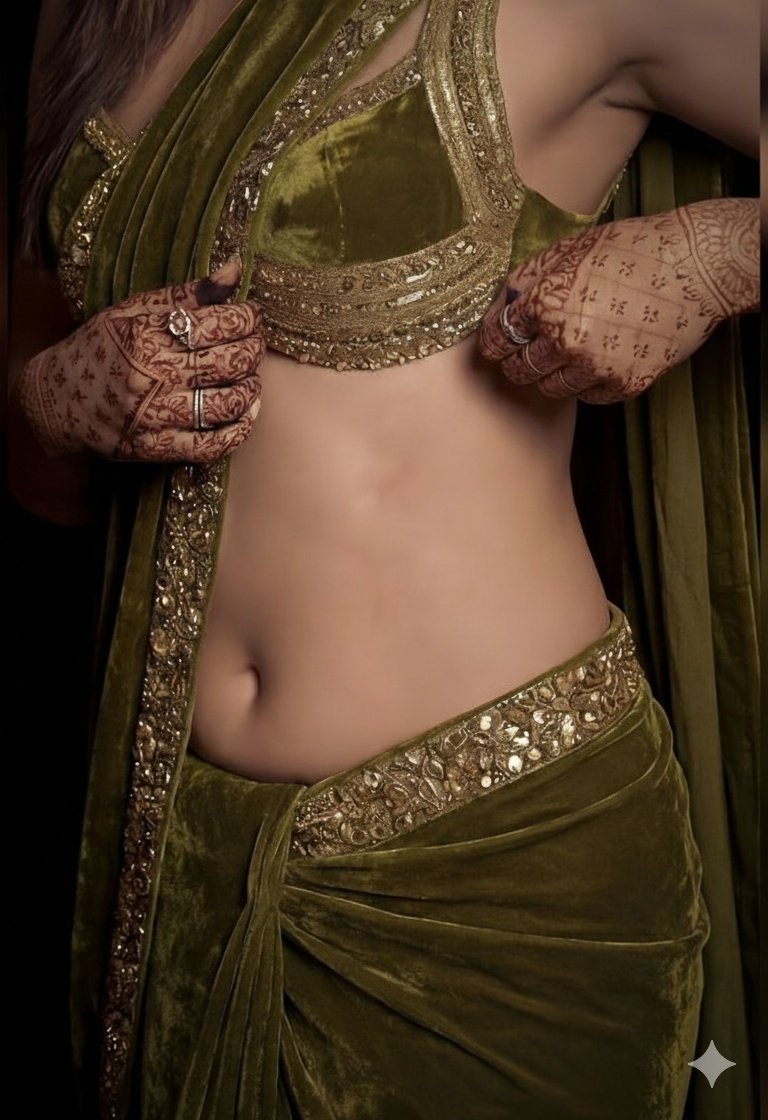
A detailed, high-fashion studio photograph of a woman posing gracefully, wearing
A detailed, high-fashion studio photograph of a woman posing gracefully, wearing a luxurious olive green velvet saree draped elegantly over her shoulder, paired with a matching heavily embroidered sleeveless blouse that highlights her midriff. The lighting is moody and dramatic, accentuating the rich texture of the velvet and giving her skin a subtle, dewy sheen. Her hands are adorned with intricate, dark henna (mehndi) designs, and she is wearing traditional gold earrings, looking directly into the camera with a confident expression.
훌륭한 AI 이미지 프롬프트 작성법
피사체부터 시작하세요
스타일을 설명하기 전에 이미지가 누구 또는 무엇에 관한 것이며 무슨 일이 일어나는지 먼저 적으세요. 앞쪽의 디테일이 가장 큰 비중을 갖습니다.
빛, 렌즈, 분위기를 설명하세요
조명, 카메라 거리, 분위기는 '멋진', '아름다운' 같은 형용사보다 이미지를 훨씬 크게 바꿉니다.
필요한 텍스트는 따옴표로 묶으세요
이미지에 꼭 들어가야 하는 단어는 큰따옴표 안에 넣고, 상단의 헤드라인처럼 들어갈 위치를 함께 적으세요.
모델 팁
키워드 나열 대신 평범한 문장으로 작성하면 어떤 모델이든 장면을 잘 따라갈 수 있습니다.
이용 방법
- 01
아이디어 설명
몇 단어면 충분합니다. 색상, 텍스트, 원하는 분위기 등 꼭 필요한 디테일이 있으면 추가하세요.
- 02
상세한 프롬프트 받기
생성기가 선택한 모델에 맞춰 구도, 조명, 스타일 디테일로 아이디어를 확장합니다.
- 03
이미지 생성
프롬프트를 이미지 작업 공간으로 보내 원하는 대로 수정하고, 준비되면 생성하세요.
자주 묻는 질문
- AI 이미지 프롬프트 생성기는 무료인가요?
- 네. 프롬프트 작성은 무료이며 크레딧을 사용하지 않습니다. 작업 공간에서 이미지를 생성하기로 선택했을 때만 크레딧이 사용됩니다.
- 이미지를 생성하려면 다른 AI 구독이 필요한가요?
- 아니요. CinePixel은 사용한 만큼 차감되는 크레딧으로 AI 이미지 생성을 제공하므로 별도의 외부 AI 플랜이 필요 없습니다.
- 아이디어를 중국어나 다른 언어로 설명해도 되나요?
- 네. 어떤 언어로든 아이디어를 설명한 뒤, 완성된 프롬프트를 영어 또는 중국어로 작성할지 선택하세요.
- 사진 편집용 프롬프트도 작성해 주나요?
- 네. '내 사진 편집'을 선택하면 무엇을 바꾸고 무엇을 유지할지 알려 주는 편집 지시문을 작성해 줍니다. 작업 공간에서 사진을 업로드해 적용하세요.