
Skip to content
CinePixel logoCinePixel
Explore a packaging direction before production
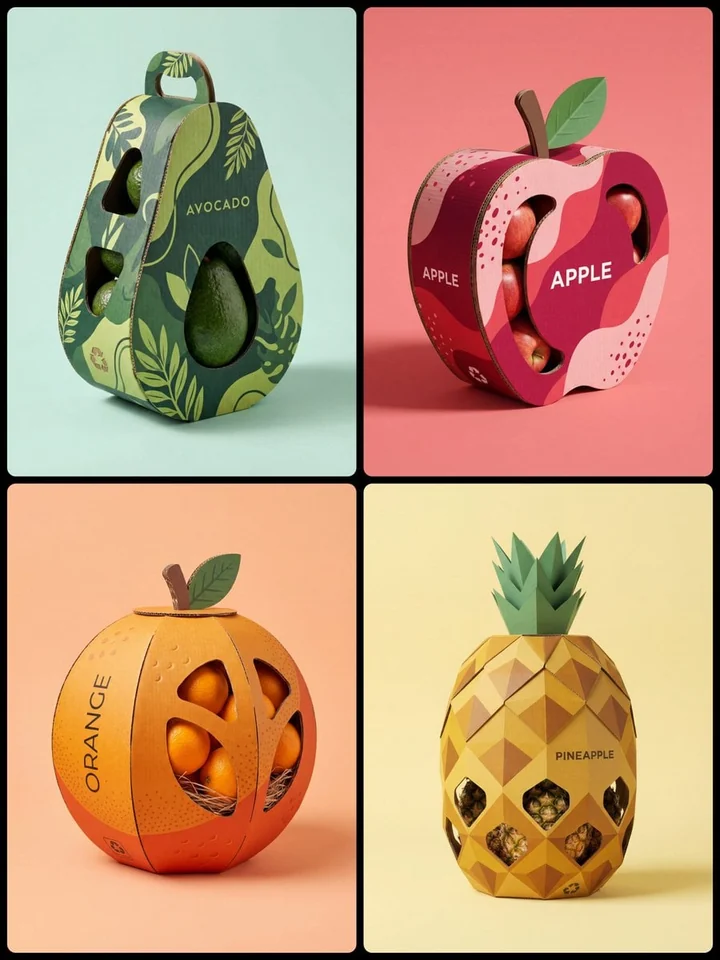
CinePixel review board showing four corrugated fruit-packaging concepts with die-cut windows

Evidence-backed packaging concepts

Explore a packaging direction before production

Turn a written product brief into one reviewable packaging direction. Explore structure, corrugated material, color, pattern, die-cut windows, and shelf presence without treating the result as engineering or print artwork.

Model owner

Gemini 3 Pro Image

Catalog prompt

#437

Supported frames

3:4, 1:1

Concept media by ΛRMIN | AI: @Arminn_Ai · CC BY 4.0

Compare capable models for this task

The verified Prompt for Explore a packaging direction before production is owned by Gemini 3 Pro Image. These alternatives cover the required workflows and output shapes; compare typed facts before choosing.

Compare 3 capable models

Explore image generators by task

Jump into a focused image generator for a specific creative task, then continue in its canonical CinePixel workspace.

Browse the full generator directory
  1. Why it is relatedSame Text to Image workflow · Same prompt-led startPoster conceptsDevelop bold poster directions with a controlled subject, material treatment, color system, and portrait framing.
  2. Why it is relatedSame Text to Image workflow · Same prompt-led startAnime scene concepts
  3. Why it is relatedSame Text to Image workflow · Same prompt-led startBook illustration scenes
  4. Why it is relatedSame Text to Image workflow · Same prompt-led startCyberpunk wallpaper concepts

How it works

Move from a product brief to one reviewable package direction

01

Write a bounded packaging brief

Define the real product category, package form, contents, material mood, opening or window, palette, pattern, and shelf context. Keep brand and legal text separate unless it has been approved.

02

Use the proven text-first workflow

Open Gemini 3 Pro Image with Prompt 437 selected, then choose a supported 3:4 or 1:1 frame that fits the concept review you need.

03

Review before engineering

Review silhouette, product visibility, closure logic, material cues, label hierarchy, scale, repeated details, and misleading claims. Send only an approved direction into professional design and engineering.

Packaging direction studies

Compare visual choices before technical development

Use the generated image to compare one visual direction at a time. It is not a dieline, CAD model, dimensioned drawing, verified label, legal review, print file, prototype, or production guarantee.

Form and product visibility

Explore boxes, bottles, pouches, jars, cans, sleeves, handles, windows, and sculptural silhouettes without claiming that the generated geometry can be manufactured.

Material and finish mood

Compare corrugated board, paper, glass, metal, plastic, matte, gloss, or natural-material cues before a specialist specifies real substrates and finishes.

Early stakeholder review

Create a focused visual for founder, designer, marketing, or merchandising review while keeping claims, dimensions, compliance, cost, and manufacturability as separate workstreams.

Scope and production boundaries

Know what the concept can and cannot prove

What should I change in Prompt 437?

Prompt 437 is a text-only structural packaging brief. Replace its product, shape, pattern, colors, contents, name, top detail, and background placeholders with one coherent concept. Avoid inserting unverified claims, regulated copy, or protected brand assets.

Why does this task use Gemini 3 Pro Image?

Prompt 437 is cataloged as a text-only Nano Banana-family prompt, whose canonical CinePixel model owner is Gemini 3 Pro Image. The task route uses that published owner and only ratios supported by its Text to Image capability.

Is the result print-ready or structurally accurate?

No. Treat the image as a visual direction. A packaging designer and engineer must still create dielines, measurements, materials, closures, accessibility, barcodes, legal copy, print separations, prototypes, tests, and production files.

Does the page generate automatically?

No. The handoff opens Gemini 3 Pro Image in Text to Image mode with Prompt 437 selected and prompt focus visible. Generation starts only after you review the brief and choose to proceed.

Continue with the verified packaging concept prompt

Open Gemini 3 Pro Image with Prompt 437 ready, refine one packaging direction, and generate only when you choose to proceed.

Open packaging workspace