
Create Your First AI Image
Make one product-photo concept with a clear brief, a starter prompt, and a source-to-result review before deciding what to keep.
Your first image is easier to judge when it has one job. This guide uses a square social concept for an unbranded blue pump bottle. The goal is to explore a setting and learn to review the result, not to produce an approved catalog photo on the first attempt.
Set a brief you can check
Before opening the Image workspace, write down the destination, the visual direction, and the facts that must survive. For this practice task:
- Destination: a square social image with space for campaign copy added later.
- Allowed to change: background, surface, lighting, shadows, and camera framing.
- Must be checked against the source: bottle silhouette, cobalt-blue color, curved metal pump, and plain white band. Do not invent a brand name or claim that generated lettering is approved.
If you have permission to use a source photo, choose a model that explicitly supports an image reference before attaching it. A text-only result is useful for scene exploration, but it cannot establish that a real product has been reproduced accurately. Check the selected model's inputs, shape controls, and live credit estimate in the workspace before generating.
Try a focused starter prompt
The following is a practice prompt, not a record of the input that produced the reviewed example below:
A single unbranded cobalt-blue pump bottle on a pale stone surface, with soft side light and a calm editorial background. Square composition, bottle as the focal point, and clear space to the right for copy added in design. Use the approved reference for the bottle's color, rounded silhouette, curved metal pump, and plain white band. No generated logo or lettering.
Start with one candidate. If the first image misses the job, change one decision at a time: framing, light, or background. Keep the source facts in the brief even when a model changes them. The product-photography task page explains the supported workflow and its review boundaries.
Compare a real concept with its source
This CinePixel-authored source/result pair was reviewed on August 27, 2026. It shows why a pleasing scene is not the same as an accurate product image. The practice prompt above is an example to try; it is not the documented generation input for this pair.
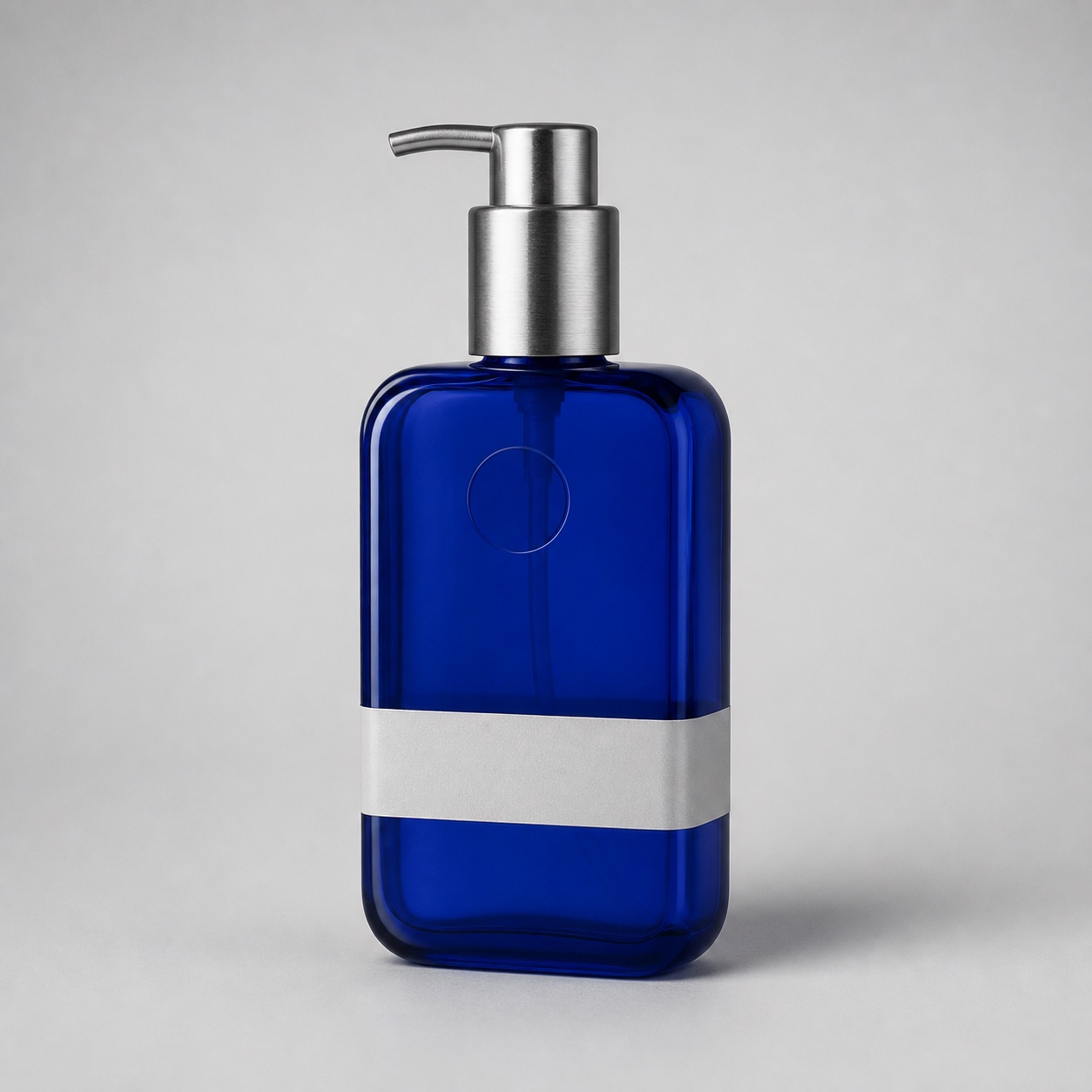
Source reference: use the bottle, not the generated image, to check product facts.
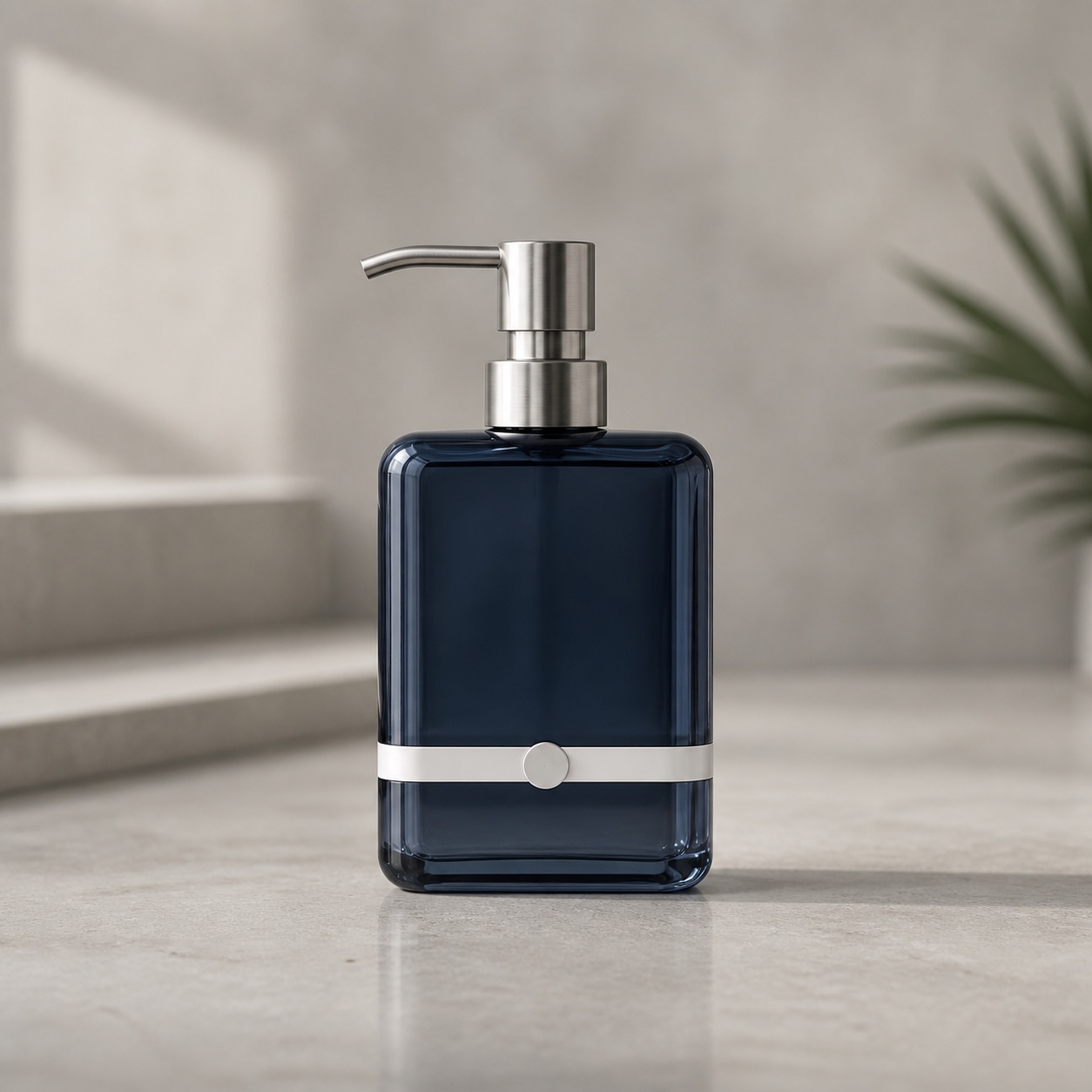
Generated concept: the scene is useful, but the product itself changed.
The result darkens the bottle from cobalt to navy, changes the pump and metal sleeve, and adds a raised circle to the white band. Those changes fail the brief's product-identity checks. Keep this as a scene concept only; do not publish it as an accurate photo of the source product. The full review workflow records the comparison and the decision in more detail.
Decide what to keep
Review the output at the size where it will appear. Check the focal point and crop, then compare every required product detail with the approved source. Save a candidate only with a note about what passed and failed. If only the framing is wrong, revise the framing; if product facts drift, return to the source and brief or reject the result for factual use. Keep any final text, rights, and product claims under human review before publication.
Next step
Turn the workflow into a reviewable creation
Bring the direction you just shaped into the prompt field, review the idea and settings, and generate only when you choose to proceed.