
Pet portraits and fictional animal scenes
List a pet's coat markings, eye color and ear shape as protected details, change only the scene or style, then check paws, tail and scale.
Use a permitted photo of one animal with visible coat markings, eye color, ear shape, muzzle and tail. Name those identity cues in the protected-details field. For a group composition give each reference a role; do not treat several photos as independent batch jobs.
The visual below is a reviewed editorial reference, not a CinePixel generation result or a model comparison. The starter brief is an original example to adapt; it does not run automatically.
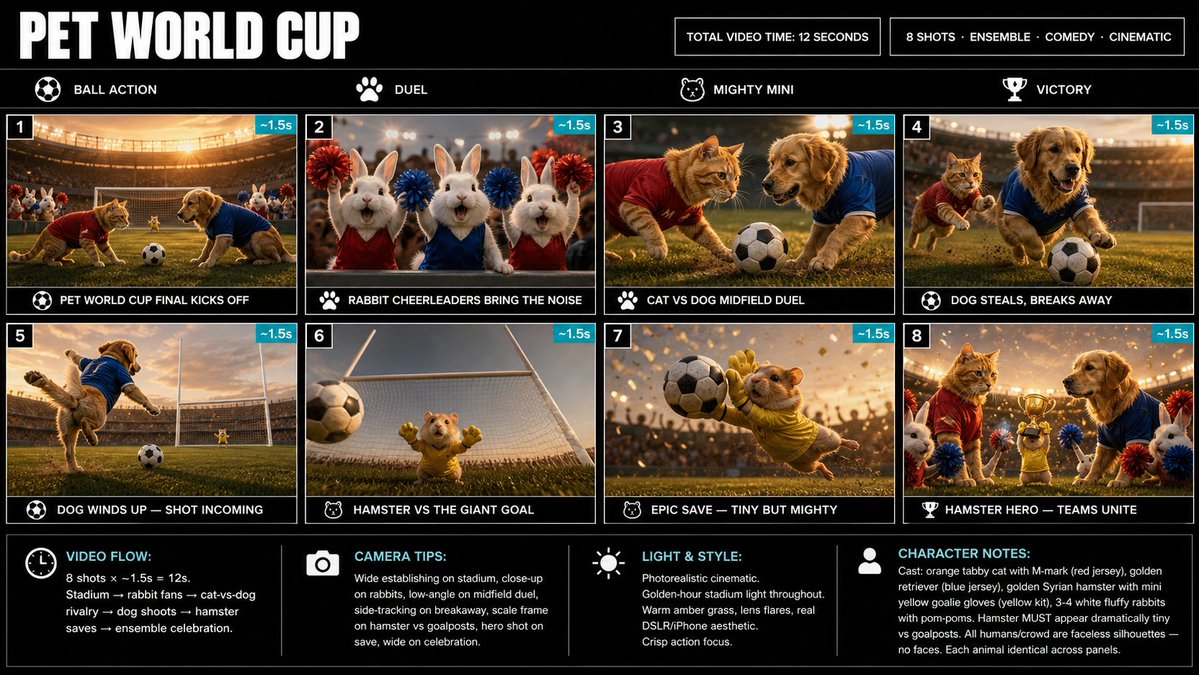
Review before reuse
The reference is an eight-panel fictional football storyboard with several animals. It demonstrates shot order and scene planning. It is a still sheet, not a completed video or proof that identity stayed constant. Check anatomy, coat markings, relative scale and consistency across every panel.
A starter brief to adapt
Keep the dog’s brown left ear, white chest patch and blue collar. Place it sitting on a neutral studio floor with soft side light. Preserve the muzzle length and eye color; change only the background. Review paws, tail and collar before keeping the output.
Continue in the current workspace
Use photo editing for a single source, composition for several roles or the character task for an identity anchor. A storyboard sheet can guide an image-to-video shot, but review a separately generated clip in full. Search the existing approved gallery rather than assuming every animal prompt is available.
Next step
Turn the workflow into a reviewable creation
Bring the direction you just shaped into the prompt field, review the idea and settings, and generate only when you choose to proceed.